Over the past few months, I've been exploring data analysis as a complementary skill to product design. Rather than picking a generic dataset, I wanted a problem that felt close to the kind of products I work on every day: SaaS platforms, subscriptions, user behavior, and business outcomes.
That led me to churn.
Customer churn sits at the intersection of product, pricing, customer success, and business strategy. It's one of those metrics that looks deceptively simple until you start asking harder questions. Who is leaving? When do they leave? Why do they leave? How much does it cost? And perhaps most importantly — could we have predicted it earlier?
For this project, I used the SaaS Subscription & Churn Analytics Dataset created by Rivalytics and published on Kaggle. The dataset provides two years of subscription, churn, refund, and customer feedback data — a useful foundation for exploring both analytical thinking and dashboard storytelling.
Alongside the analytical challenge, I wanted to test something else: how far I could push the visual design of a dashboard without sacrificing clarity. Most analytics products gravitate toward safe, corporate aesthetics. I was curious whether a stronger visual identity could make insights more engaging while still preserving signal and readability.
Although the dataset arrived relatively clean and structured — meaning there was little need for SQL-based preparation — the project still required a series of qualitative decisions before any charts were created.
The first challenge wasn't technical. It was deciding what story should be told.
Defining the Audience
Before building a single visualization, I needed to answer a simple question: who is this dashboard for?
I chose to design for leadership and executive stakeholders. That decision influenced every chart, metric, and layout choice that followed. Executives rarely need raw data. They need a narrative that moves from problem identification to decision-making as efficiently as possible.
How much → When → Why → What it costs → What to do next.
Each row progressively answers a deeper version of the same question. Leadership can stop at any level of detail and still leave with a coherent understanding of the problem.
KPI Strip
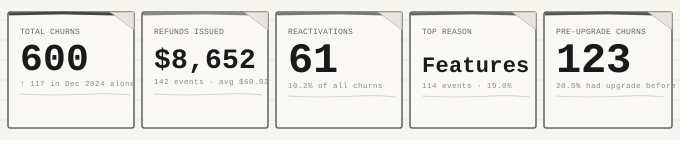
The first row contains five headline metrics: total churns, refunds, reactivations, the most common churn reason, and churns occurring before an upgrade. The strip exists to answer the question every executive asks before the discussion even begins — how bad is it?
Six hundred churn events across two years might not sound alarming in isolation. However, seeing that 117 of those occurred in a single month immediately changes the interpretation. The number becomes a trend rather than a statistic. The reactivation and pre-upgrade indicators were included because they represent signals leadership can act on immediately, without waiting for a lengthy product development cycle.
Row 1: When and Why
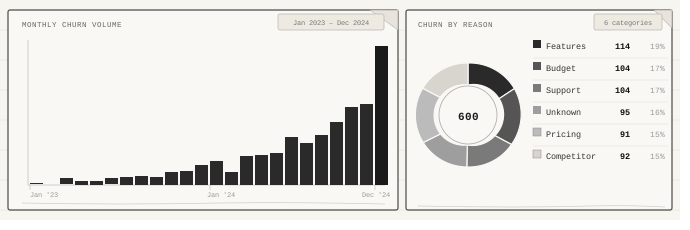
The first analytical layer combines a monthly churn trend chart with a churn-reason breakdown. The bar chart answers when customers are leaving — and more importantly, it reveals the shape of the problem. Churn does not gradually increase. The data shows a sharp acceleration during late 2024.
Beside it, the reason distribution offers the first answer to why customers leave. What stood out most was the absence of a dominant explanation. Feature limitations, budget concerns, and support issues all contribute at similar rates. Rather than pointing toward a single fix, the data suggests a broader systemic challenge spanning multiple parts of the customer experience.
Row 2: Customer Language and Early Signals
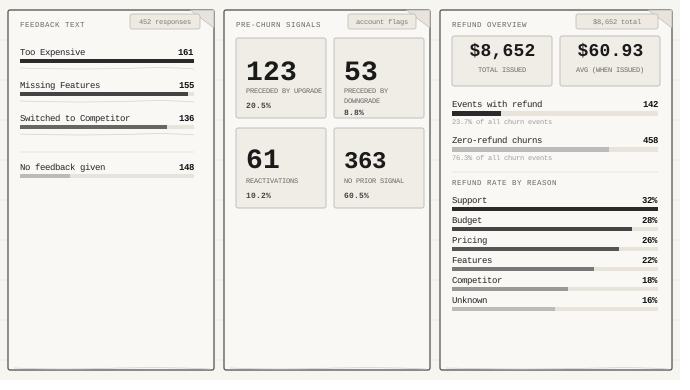
The second layer explores customer feedback, behavioral signals, and refund patterns. Reason codes can sometimes feel abstract — free-text feedback translates those categories into language people actually use. Phrases such as too expensive and missing features account for the majority of responses, reframing the conversation from technical categories into perceived customer value.
The pre-churn signal section was designed to answer a recurring stakeholder question: could we have seen this coming? The data suggests yes. Roughly one in five churned accounts upgraded shortly before leaving, indicating a potentially important warning pattern worth further investigation.
Refund metrics were included because financial impact inevitably enters strategic discussions. Connecting refund rates directly to churn reasons helps bridge operational and financial perspectives.
Row 3: Evidence and Validation
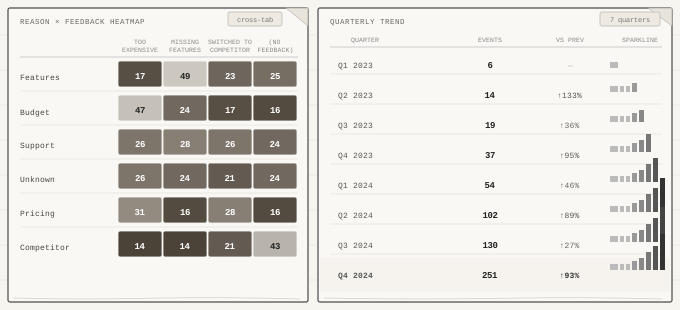
The final analytical layer focuses on evidence. A reason-versus-feedback heatmap exposes relationships hidden inside aggregated metrics. Budget-related churn overwhelmingly aligns with pricing concerns, while competitor-related churn often arrives with little or no feedback at all. This distinction matters because it changes where future research effort should be invested.
Alongside the heatmap sits a quarterly trend table with inline sparklines. Its purpose is not to show that churn increased — earlier charts already established that. Instead, it demonstrates that acceleration itself has become the trend.
After defining the analytical narrative, the next challenge was visual direction. Rather than adopting a conventional business dashboard style, I experimented with a darker, more industrial visual language inspired by trading terminals and mission-control interfaces. The goal was not decoration — the goal was to create an environment where information felt important.
Visual System
Colors. A near-black background (#0d0f14) serves as the foundation, while a lime-acid accent (#e8ff47) highlights primary metrics and critical signals. Orange, blue, red, and green provide categorical distinction without overwhelming the interface.
Typography. The type system combines Syne and DM Mono. Syne provides large, geometric forms for headlines and key metrics, while DM Mono introduces a technical, system-oriented character for labels and metadata.
Layout. The dashboard uses a dense grid with sharp edges, 1-pixel dividers, and intentionally avoids rounded corners. The objective was to communicate precision rather than friendliness. Small details — dot-grid textures, colored KPI indicators, and staggered entry animations — help create hierarchy without competing with the data itself.

Once the dashboard was complete, I translated the analysis into a 10-slide executive presentation. The challenge shifted from exploration to communication. The dashboard enables discovery. The presentation guides attention.
01 Title — Context-setting with headline KPIs
02 Agenda — Overview of the analytical journey
03 Scale — KPI summary and key insight
04 Acceleration — Churn trend and growth pattern
05 Why They Leave — Churn reason analysis
06 What They Say — Customer feedback themes
07 Pre-Churn Signals — Early warning indicators
08 Refunds — Financial impact analysis
09 Implications — Strategic interpretation
10 Actions — Prioritized recommendations


The presentation structure mirrors the dashboard logic but introduces stronger narrative sequencing, making it suitable for stakeholder discussions and decision-making sessions.
Several findings stood out. Churn is not simply increasing. It is accelerating. December 2024 alone accounts for nearly one-fifth of all churn events in the dataset.
The relationship between structured reasons and customer language was also interesting. While Features appears as the leading churn category, Too Expensive dominates free-text responses. That discrepancy may indicate a deeper value-perception issue rather than a purely feature-related problem.
From a personal perspective, the project also served as a practical introduction to modern data-analysis workflows. Beyond the business insights, it provided hands-on experience with Python, Pandas, Plotly, and Streamlit, while reinforcing a lesson that applies equally to analytics and product design:
Data rarely tells a story on its own. The real work lies in deciding which questions matter, what evidence supports them, and how that evidence should be communicated to the people making decisions.
Live dashboard — duskostamenic.github.io/ravenstack_dashboard
GitHub repository — github.com/DuskoStamenic/ravenstack_dashboard
Dataset — SaaS Subscription & Churn Analytics Dataset by Rivalytics