As a designer, my process has typically started with research, moved through pen-and-paper sketches, and then transitioned into Figma or other UI design tools. However, the rapid evolution of AI technology has reshaped the way I work. I've fully embraced AI — not just for visual exploration, but also for accelerating development. While I've experimented with several AI-powered development tools, Firebase Studio has been the most effective in my experience. It's fast, reliable, and enhances my ability to bring ideas to life efficiently.
Using the Newest Tech to Sketch Ideas
While exploring new ways to integrate AI workflows into the project management app I'm currently working on, I was reminded of how Midjourney uses "/" (slash commands) to trigger actions in the Discord chat. That sparked an idea! As I was redesigning the Timesheet page, I began to imagine how we could combine users' tracked time data with an AI assistant, activated through slash commands like /summarize, /ask, or /help. There were also some other ideas for the slash commands, but at the beginning I settled with these three. This approach could give users a simple, conversational way to gain insights from their data and interact more intuitively with the system.
Then, instead of reaching for pen and paper or opening Figma, I went straight into Firebase Studio. While not perfectly structured, this prompt captures more of my spontaneous thoughts:
An AI app that allows the user to communicate with it through slash commands.
First step for the user is to upload a database from software like Airtable, or upload a local spreadsheet, or even just a plain text file.
Then AI will process it and take all the data.
Then user will be able to communicate with it through slash commands like "/help", "/ask" or "/summarize". This is a main feature, and slash commands should be easy to use.
Use minimalistic style for the interface. Use dark color palette with clear CTA.
Developing the MVP
Of course, there was some back-and-forth with prompts and adjustments before the app became fully usable. But I loved the fact that refining and adding features could be done simply through prompting. I won't go deep into every step, but I can say it took me less than an hour to design the first version, refine it, add some crucial features and visual refinements, and at the end get to this MVP version:
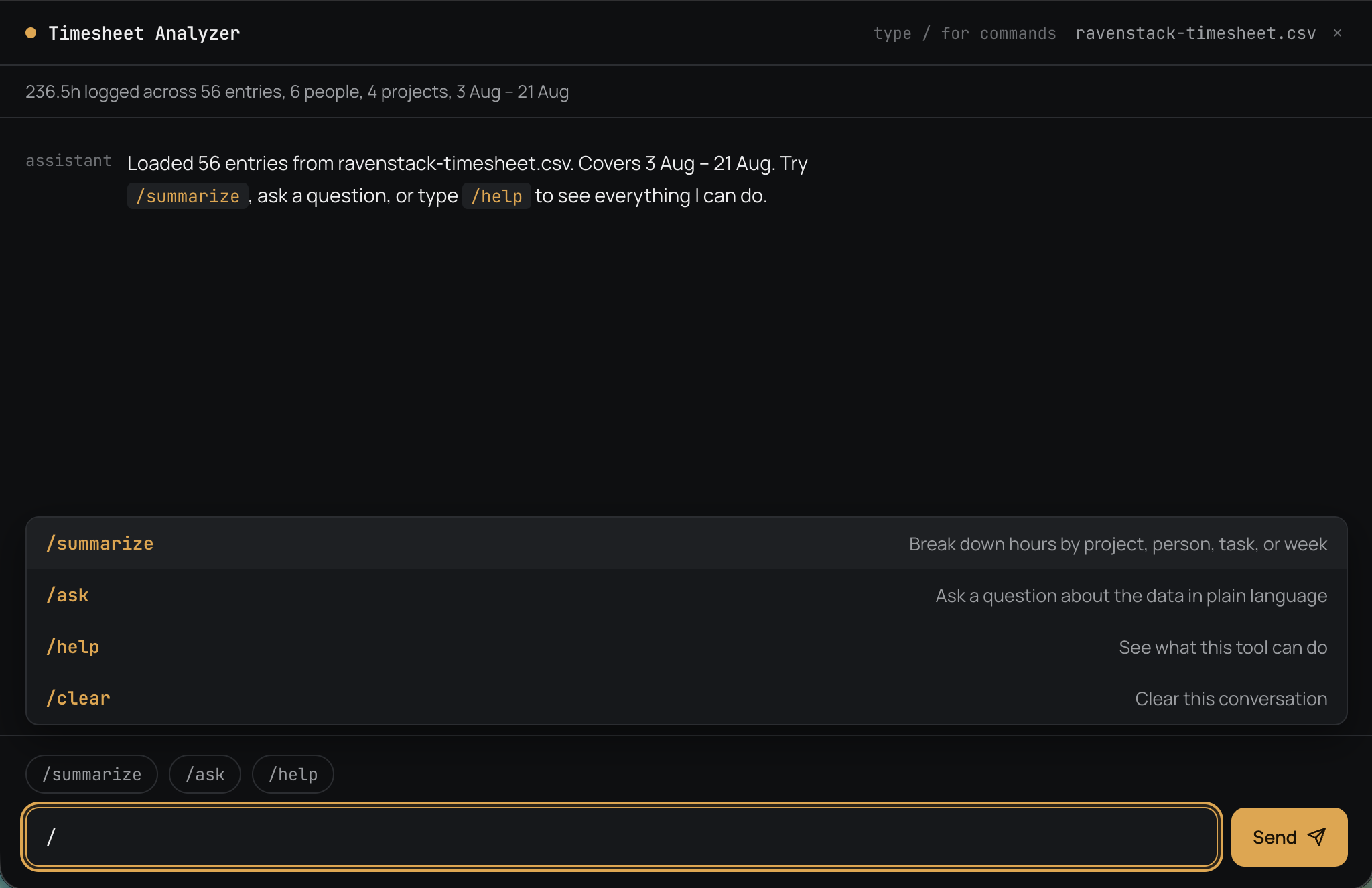
Having the Intended Interaction
I uploaded the spreadsheet from my computer, started using slash commands — and it worked! The AI understood the content and responded with meaningful answers. And just like that, the Timesheet Analyzer was born.
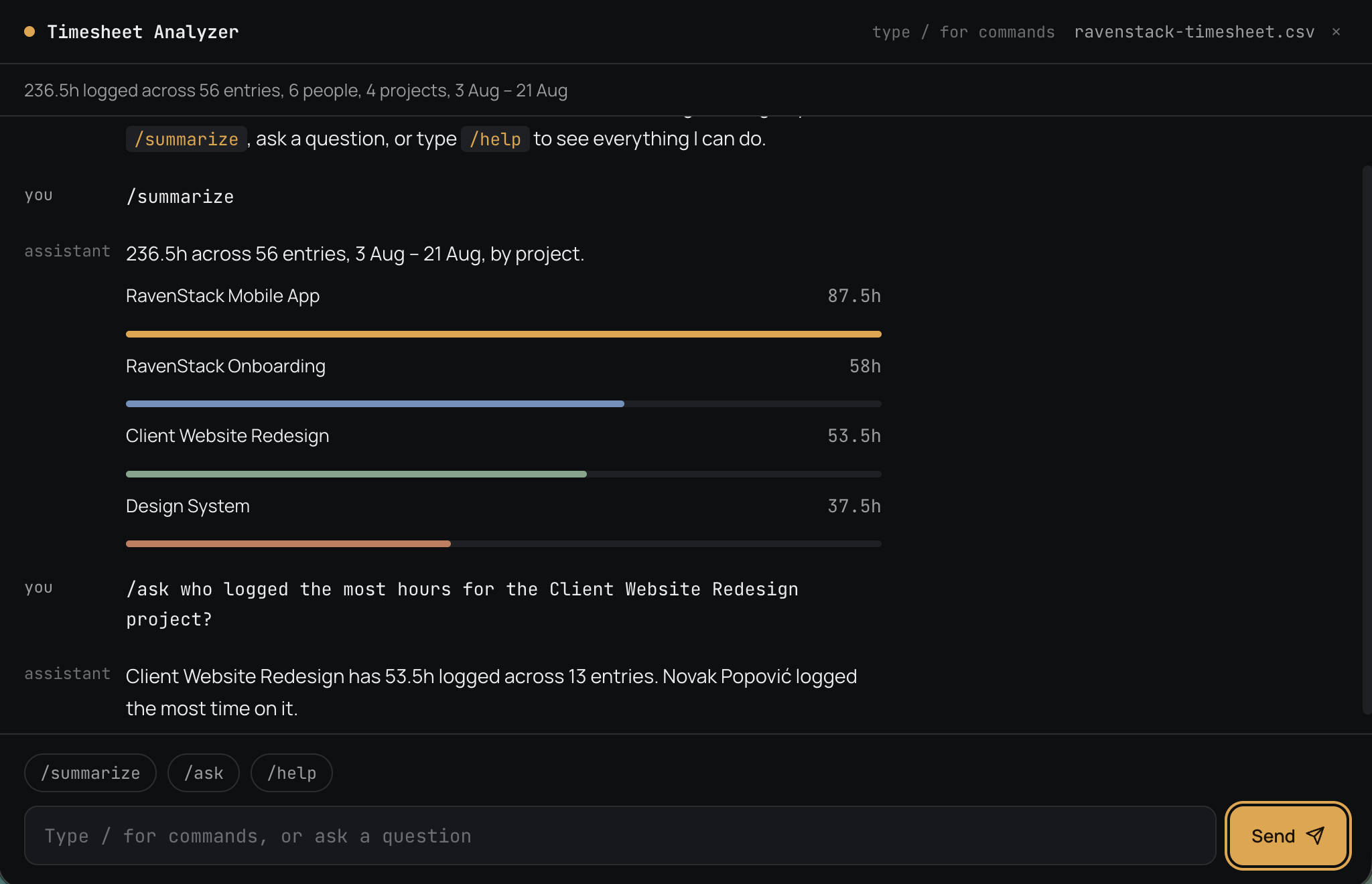
This experience marked a significant shift in how I approach designing and prototyping digital products. Instead of relying solely on traditional tools like Figma or pen-and-paper sketches, I embraced AI as a collaborative partner — one that not only visualizes ideas but actively helps build them. Although it's nowhere near as polished as I would have designed it in Figma, it's a valuable starting point that helps me understand which elements and interactions to consider once the UI phase begins.
By experimenting with slash-command workflows and using Firebase Studio, I was able to go from concept to a functional prototype in under an hour. It reinforced the idea that with the right tools, designers can blur the lines between ideation and development, turning raw ideas into working solutions faster than ever before.
Timesheet Analyzer is now live. Give it a try and see how it can turn your timesheet data into useful insights. Try Timesheet Analyzer →